United Kingdom
+44 (0) 1628 660600
hello@creative-computing.co.uk
hello@creative-computing.co.uk

At Creative, we’re all about adding value to your process flow. Even though Dynamics 365 Business Central has many in-built automation features, our partner apps add an extra layer to really drive efficiency and enhance accuracy.


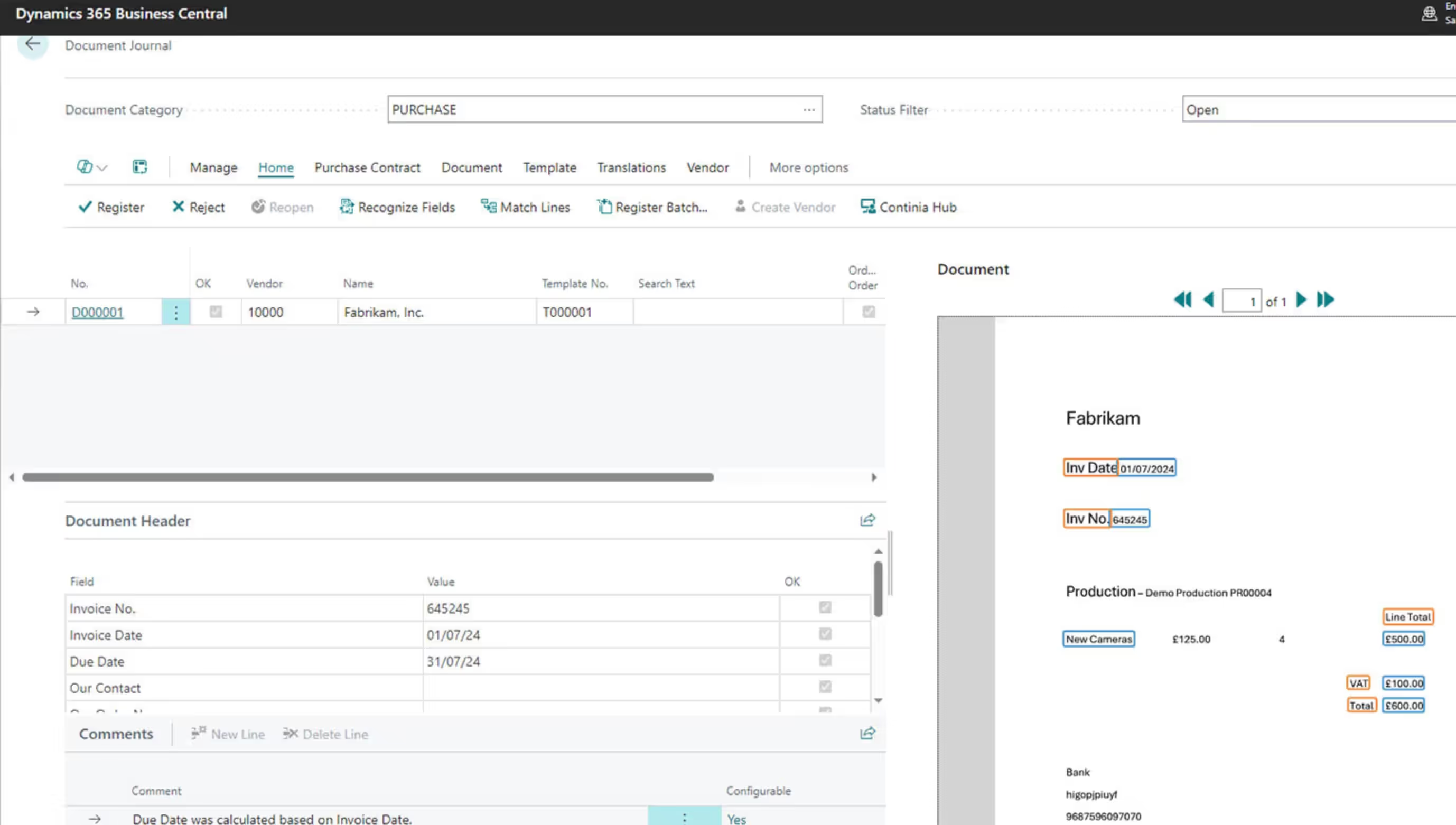
Say goodbye to spending hours on manual data entry as we bring you Continia Document Capture. Using OCR technology to bring invoice data into Business Central which automatically matches to purchase orders, with approval workflows built in and a secure archive to store your documents, you can be sure you’re setting your team up for success!

With Continia Expense Management, staff can easily and quickly submit their expenses for receipts, mileage, per diem, or credit cards on the mobile app and once submitted, the data automatically goes for approval. It’s never been quicker or simpler to submit and manage expenses, plus you get a real-time view of employee spending.

With this time saving, digital file output solution, you can manage all your outgoing files and keep an overview of all sent and drafted documents. Avoid accidentally sending sensitive documents to the wrong company and automate email distribution so you can focus on more important tasks!

Gain full view and handle all your vendor, employee, customer payments, and credit memos securely in one place. With Payment Management you can manage all your online payments from different banks, foreign currency, and bulk payments in just a few clicks!

Using Open Banking technology, instantly connect your bank account to Business Central and benefit from real-time insights, rapid secure transactions, and transfer funds to over 2,000 banks in 19 countries.


Helping you understand how we can support your business.
Continia Document Capture uses OCR (Optical Character Recognition) combined with AI to automatically read incoming supplier invoices (whether they arrive by email or in paper form) and bring the data directly into Business Central. It then automatically matches invoices to existing purchase orders through a three-way matching process, routes them through configurable approval workflows, and stores them in a secure, searchable archive. This replaces the traditional manual process of keying in invoice data, chasing approvals via email, and filing paper copies, saving significant time and reducing the risk of errors or duplicate payments.
Yes, the Continia Expense Management mobile app is designed for exactly this. Employees can photograph receipts directly from their phone, log mileage using Google Maps route suggestions, claim daily allowances with built-in per diem functionality, and submit credit card expenses, all from the app. Once submitted, the data flows automatically into Business Central and is routed through your approval workflow without any manual rekeying. Finance teams get a real-time view of employee spending, and the whole process is dramatically faster and more accurate than traditional paper-based expense claims.
Continia Document Output is designed specifically for this. It gives you full control over outgoing documents like invoices, statements, remittances, and reports, allowing you to automate email distribution, personalise emails and PDF templates for different customer groups, schedule documents to send in the background, and maintain a complete archive of everything sent. It also helps prevent the risk of sensitive documents being sent to the wrong recipient, which is a common pain point for businesses sending large volumes of outgoing correspondence from Business Central.
Continia Payment Management connects directly to your bank and allows you to manage all vendor, employee, and customer payments from within Business Central. You can handle multiple banks, foreign currencies, and bulk payments in just a few clicks, with approval workflows built in to ensure every payment is authorised before it's sent. The system includes IBAN validation, statement intelligence to optimise reconciliations, and the ability to batch payments to reduce overall banking fees. Compared to manual payment runs, it significantly reduces the risk of errors, fraud, and unauthorised payments.
Yavrio uses Open Banking technology to create a live, secure connection between your bank accounts and Business Central, meaning your bank transactions feed directly into the system in real time rather than requiring manual statement imports. This makes bank reconciliation far faster and more accurate, as transactions appear in Business Central as they happen and can be matched against posted entries automatically. The integration supports connections to over 2,000 banks across 19 countries and uses a simplified, secure authentication process, giving your finance team a much cleaner and more controlled view of your cash position at any given moment.


.jpg)


.jpg)
.jpg)